Deploy sample app
- BPMN - process def
- DMN - decision table
- Form - UI component
- Job Worker - custom app "toolkit"
The "toolkit" folder has custom app. You may explore the code in VS Code IDE.
Run this command in Cloud Shell to check access to the Docker image.
# We'll be using the pre-built Docker image for the custom app.


# Image Name: {{REGION}}-docker.pkg.dev/c8-labs/c8-labs-repo


docker manifest inspect {{REGION}}-docker.pkg.dev/c8-labs/c8-labs-repo/toolkit-app:v1
Run this command in Cloud Shell to check access to the Docker image.
Deploy the worker tookit JAR.
export UNAMESPACE={{UNAMESPACE}}


envsubst '${UNAMESPACE}' < deploy-worker-toolkit.yaml  | kubectl apply  -f -
Add ingress to enable traffic flow to the deployed services.
envsubst '${UNAMESPACE}' < c8-ingress-with-toolkit.yaml | kubectl apply -f -
Deploy process artifacts.
Check to make sure Lead To Opportunity solution artifacts are deployed -
export ORCH_SECRET=$(kubectl get secret identity-secret-for-components -n ${UNAMESPACE} -o jsonpath="{.data.zeebe-secret}" | base64 --decode)


export TOKEN=$(curl https://${UNAMESPACE}.makelabs.in/auth/realms/camunda-platform/protocol/openid-connect/token  \
   -H 'Content-Type: application/x-www-form-urlencoded' \
   -d 'grant_type=client_credentials' \
   -d 'client_id=orchestration'   -d "client_secret=${ORCH_SECRET}" | jq -r '.access_token' )


curl -v --request GET \
  --url "https://${UNAMESPACE}.makelabs.in/orchestration/v2/topology" \
  --header "Authorization: Bearer $TOKEN" -H 'Content-Type: application/x-www-form-urlencoded'


curl -v --request POST "https://${UNAMESPACE}.makelabs.in/orchestration/v2/deployments" \
  -H "Authorization: Bearer $TOKEN" \
  -H 'Accept: application/json' \
  -F resources=@1-lead-to-opportunity-dmn-form-webhook/new-lead-approval.dmn


curl -v --request POST \
  --url "https://${UNAMESPACE}.makelabs.in/orchestration/v2/deployments" \
  --header "Authorization: Bearer $TOKEN" \
  --header 'Content-Type: multipart/form-data' \
  --form 'resources=@1-lead-to-opportunity-dmn-form-webhook/lead-to-opportunity-with-dmn.bpmn'


curl -v --request POST \
  --url "https://${UNAMESPACE}.makelabs.in/orchestration/v2/deployments" \
  --header "Authorization: Bearer $TOKEN" \
  --header 'Content-Type: multipart/form-data' \
  --form 'resources=@1-lead-to-opportunity-dmn-form-webhook/lead-to-opportunity-with-webhook-Form.form'
Operate console.
https://{{UNAMESPACE}}.makelabs.in/orchestration/operate
Check to make sure Lead To Opportunity solution artifacts are deployed -
BPMN process, DMN rule and Form
Now that solution is deployed, lets do a dry run with curl command.
curl -v --location --request PUT 'https://{{UNAMESPACE}}.makelabs.in/connectors/inbound/new-lead-record' \
--header 'key: SRM-web-hook-8ui3nm' \
--header 'Content-Type: application/json' \
--data-raw '{
    "companyName": "New Vista Travel Corp",
    "companyPincode": "600001",
    "companyContactPhone": "9836712345",
    "companyContactEmail": "c@mail.com",
    "agentNotes": "Meets the criteria as outlined in the last month sales manual",
    "x-api-key": "SRM-web-hook-8ui3nm"
}'
It may take a minute or so for Ingress to be in action. If you see http status 404 error, please try after sometime.
You may check the runtime process instance viaOperate console.
https://{{UNAMESPACE}}.makelabs.in/orchestration/operate
Post Command-Set Execution: Check the Curl response http status - 200
Click on image to enlarge

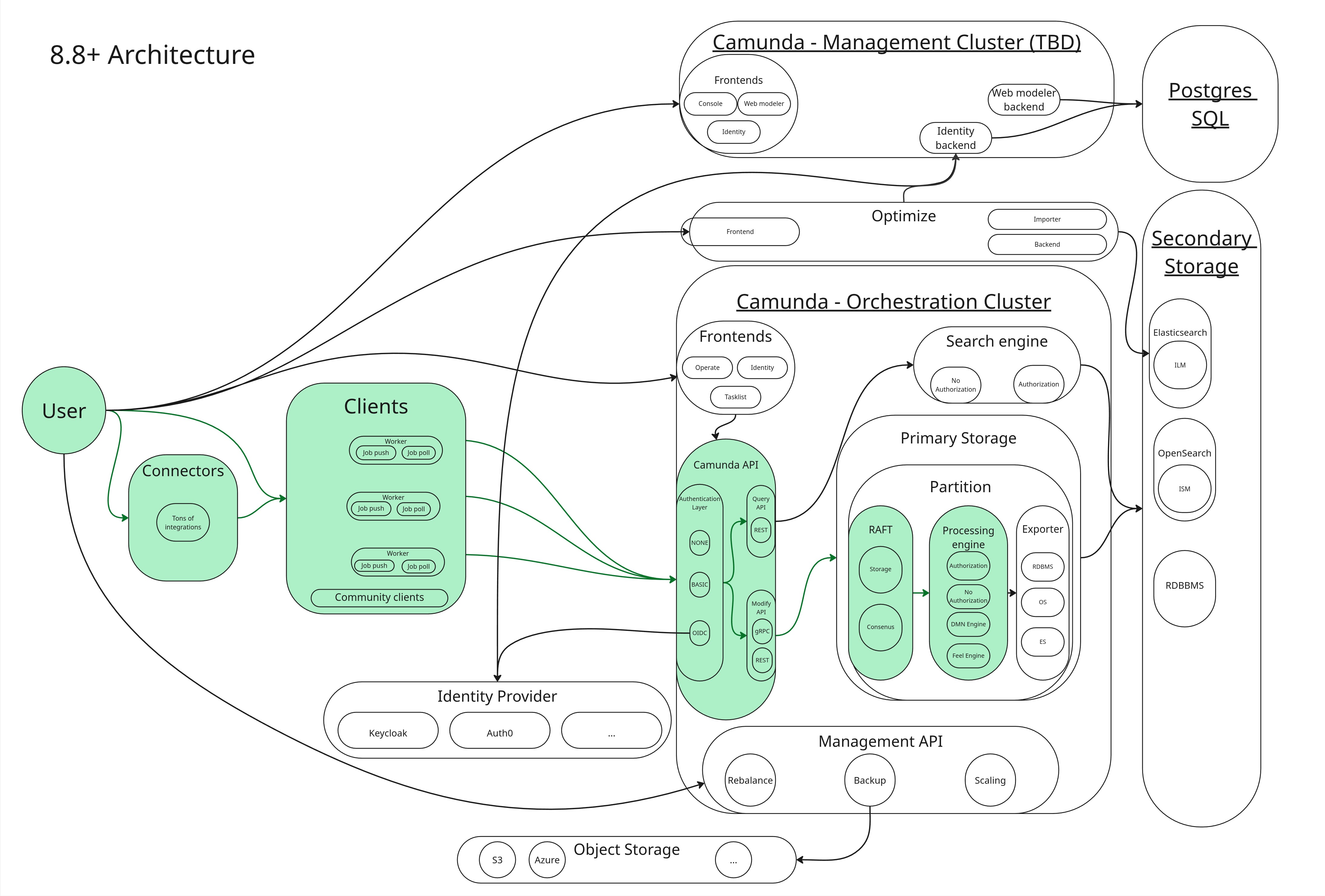
Post Command-Set Execution: Can you trace the Data Flow associated with this invocation?
Here is Camunda Official representationn of the Data Flow. For more info, visit Camunda 8.9 Documentation
Click on image to enlarge